# Virgil Pure WordPress Plugin
[Introduction](#introduction) | [Features](#features) | [Installation](#installation) | [How To Use Plugin](#how-to-use-plugin) | [F.A.Q](#faq) | [License](#license) | [Support](#support)
## Introduction

[Virgil Pure Wordpress Plugin](https://wordpress.org/plugins/virgil-pure) is a free tool that protects user passwords from data breaches and both online and
offline attacks, and renders stolen passwords useless even if your database has been compromised.
Virgil Pure is based on a powerful and revolutionary cryptographic technology that provides stronger and more modern security and can be used within any database or login system that uses a password, so it's accessible for business of any industry or size.
Learn more about the Pure technology [here](https://virgilsecurity.com/announcing-purekit).
## Features
#### Available
- Zero knowledge of users' passwords
- Passwords protection from online and offline attacks
- Instant invalidation of stolen database
#### Coming soon
- User data encryption with a personal key
- Plugin deactivation and restoration of the previous authorization system
## Installation
Currently the plugin is available only for **PHP7.2**!
In order to install the Pure Plugin you need to go through the following steps:
- add the "vsce_phe_php" extension into your server
- and then install the Plugin from the [WordPress Plugin Directory](#from-the-wordpress-plugin-directory) or from [this repository](#from-this-repository)
### Step #1. Add the "vsce_phe_php" extension into your server before using the Plugin
- [Download](https://github.com/VirgilSecurity/virgil-pure-wordpress/releases), unzip and execute on your server [virgil-test.php](/_help/virgil-test.php) file.
- [Download](https://github.com/VirgilSecurity/virgil-pure-wordpress/releases) and unzip *vsce_phe_php* extension according to your server operating system.
- Make sure you have access to edit the php.ini file. For example, use *root*
```
$ sudo su
```
- Add the *extension=vsce_phe_php* string in to the php.ini file
```
$ echo "extension=vsce_phe_php” >> (PATH_TO_PHP.INI)
```
- Copy extension file to the extensions directory.
- For the Linux/Darwin:
```
$ cp vsce_phe_php.so (PATH_TO_EXTENSION_DIR)
```
- Or for the Windows:
```
$ cp vsce_phe_php.dll (PATH_TO_EXTENSION_DIR)
```
- Then, restart your server or php-fpm service!
#### Extension installation example
Our web stack is: *Linux, nginx, php7.2-fpm*
- Execute the [virgil-test.php](/_help/virgil-test.php) to find out your path to the extension directory and path to
the php.ini file:
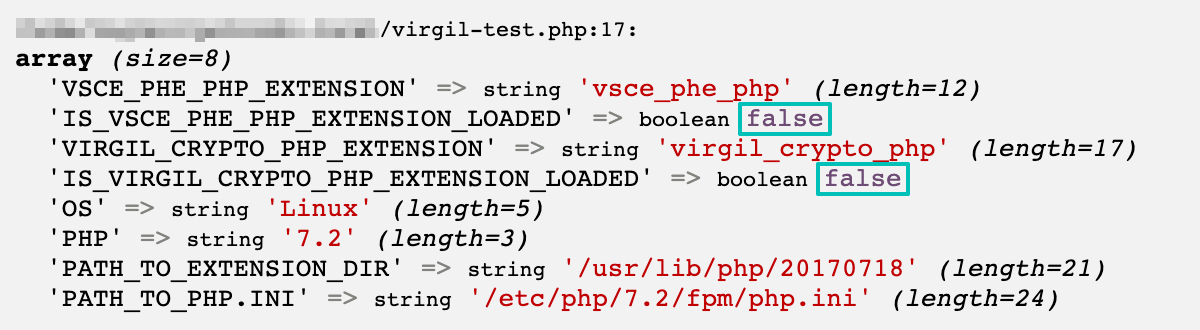
- Then, go to the command line interface (CLI) to specify the paths from the previous step:

- Reload the page in your browser to see that extension is loaded (`IS_EXTENSION_LOADED => TRUE`):
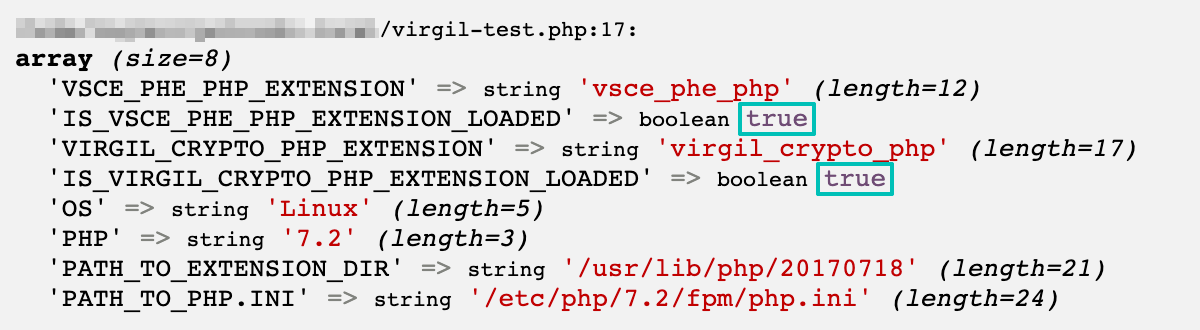
So, now you can add the Virgil Pure Plugin to your WordPress project.
### Step #2. Install Virgil Pure WordPress Plugin
- #### From the WordPress Plugin Directory
- Navigate to the WordPress Dashboard
- Open "Plugins → Add New" tab
- Find "Virgil Pure" on the WordPress Plugin Directory
- Install and activate the Plugin
- #### From this repository
- [Download the virgil-pure.zip file](https://github.com/VirgilSecurity/virgil-pure-wordpress/releases)
- Navigate to the WordPress Dashboard
- Open "Plugins → Add New" tab
- Upload the virgil-pure.zip file
- Install and activate the Plugin
As a result, you activated Pure Plugin:

## How To Use Plugin
### Setup Credentials
To start working with the plugin, at the plugin tab at your WordPress dashboard you'll need to place some credentials in corresponding fields. In order to do that, go through the following steps:
- create an account at [Virgil Dashboard](https://dashboard.virgilsecurity.com/)
- create Pure application
- copy your Pure application's credentials such as: `APP_TOKEN`, `APP_SECRET_KEY`, `SERVICE_PUBLIC_KEY`
- paste them into the corresponding fields
### Migration
Migration is a phase during which the plugin requests cryptographic data from Virgil server to associate users'
passwords (user_pass) with cryptographic enrollments provided by the server. Then enrollment records are created and
stored in your database (wp_usermeta) instead of users' passwords.
> Note! The plugin removes the default passwords hashes ONLY when you turn off DEMO mode.
Simply click the "Start migration" button to start migration.
### Records Update (optional)
This function allows you to use a special `UPDATE_TOKEN` to update all of the enrollment records in your database. This action doesn't requite changing users' passwords or modifying the scheme of the existing table.
Navigate to your Pure application panel at [Virgil Dashboard](https://dashboard.virgilsecurity.com/), press "BEGIN
ROTATION PROCESS", then “SHOW UPDATE TOKEN” button to get the `UPDATE_TOKEN`. Insert the `UPDATE_TOKEN` into the field at the Virgil Pure plugin tab.
## F.A.Q.
#### - What is Demo mode?
Demo mode is a mode in which no data in your database will be altered. To demonstrate how Virgil Pure works, a new column will be created to hold the newly protected password data. When you're ready to go live, your password hashes will be translated into cryptographically protected data.
It is required to migrate all users before switching demo mod off.
#### - Do users have to change their passwords if the database has been compromised?
If a database has been stolen, users do not need to change their original passwords. However, you need to rotate all user records in your database. This will use cryptography to disconnect the compromised Pure records from the original passwords, leaving any unauthorized party empty handed.
#### - How much does it cost?
Pure is a FREE toolkit. All libraries are open source and can be found on GitHub, where they are available for free to any user.
#### - What if an App Private Key gets lost?
There is no way to restore the `APP_SECRET_KEY`. The database becomes inaccessible and therefore useless. So, it makes sense to immediately make a backup of the key in any convenient form.
## License
See [LICENSE](https://github.com/VirgilSecurity/virgil-pure-wordpress/tree/master/LICENSE) for details.
## Support
Our developer support team is here to help you. Find out more information on our [Help Center](https://help.virgilsecurity.com/).
You can find us on [Twitter](https://twitter.com/VirgilSecurity) or send us email support@VirgilSecurity.com.
Also, get extra help from our support team on [Slack](https://virgilsecurity.com/join-community).