# Shortn.It #

**Contributors:** docofmedia
**Donate link:** http://docof.me/donate
**Version:** 1.7.4
**Tags:** url shortener, url shortening, shorturl, short_url, shortlink, short permalink, short url, custom short url, custom url
**Requires at least:** 2.5
**Tested up to:** 4.2.2
**Stable tag:** trunk
**License:** GPLv2 or later
**License URI:** http://www.gnu.org/licenses/gpl-2.0.html
Shortn.It is a customizable, self-hosted, URL shortener for WordPress.
## Description ##
### It's like having your own custom bit.ly service ###
You've probably seen major corporations with short URLs utilizing a domain that's shorter than their main domain, but still reflects their brand. Shortn.It allows you to achieve the same effect with your brand, no matter how large or small. All you need is Shortn.It, WordPress (2.5+), and if you want, a short domain configured as an alias. If you're not sure how to configure an alias domain, a guide can be found in the help and documentation.
Shortn.It is a customizable, URL shortener that allows you to create shortened, unique, permalinks to any and every post imaginable. **If you can post it, you can create a short link for it.** Shortn.It automatically creates a short URL using a combination of lowercase, uppercase, and numeric characters (depending on the options you've set), but can be customized to be whatever URL safe string you wish.
Shortn.It adds the appropriate tags for shorturl auto discovery and rel="shortlink" as desired.
Shortn.It provides easy functions for accessing it's generated URLs outside of Shortn.It, in your themes, or other plugins. The `the_full_shortn_url` will output just the full URL, without any formatting, which can be used in various Twitter or other microblogging plugins. `the_shortn_url_link` will output an HTML link using the configuration from Shortn.It's options page.
### Available Template Tags ###
* `the_shortn_url_link()` outputs an anchor (a) tag, ex: `http://docof.me/shortn-it`
* `get_the_shortn_url_link()` retrieves the above anchor for storage in a variable
* `the_full_shortn_url()` outputs the short URL, ex: `http://docof.me/shortn-it`
* `get_the_full_shortn_url()` retrieves the above URL for storage in a variable
* `the_shortn_url()` outputs the short URL without the domain, ex: `shortn-it`
* `get_the_shortn_url()` retrieves the above URL for storage in a variable
### Docs & Support ###
You can find help and documentation and more detailed information about Shortn.It on docofmedia.com. If you were unable to find the answer to your question on the FAQ or in any of the documentation, you should check the support forum on WordPress.org. If you can't locate any topics that pertain to your particular issue, post a new topic for it.
## Installation ##
Installing Shortn.It is a breeze.
1. Upload the `shortn-it` folder to the `/wp-content/plugins/` directory
1. Activate the plugin through the 'Plugins' menu in WordPress
1. Edit the post(s) you would like to create a Shortn.It URL for and the URL will be set once you update the post. If you wish, you may add `` in your template where you'd like the shortened URL link to show up or retrieve it using ``. If you only need to retrieve the link address, use `` or `` to output it directly.
1. If you'd like to use a separate, shorter domain for your shortened links, a guide can be found in the help and documentation.
## Frequently Asked Questions ##
### How do I find a shorter domain name? ###
A great tool to help you come up with a short domain and see what's available is Domai.nr.
### How do I configure the short domain name? ###
The short domain needs to be configured as an alias to your main domain. If you're not sure how to configure an alias domain, a guide can be found in the help and documentation.
## Screenshots ##
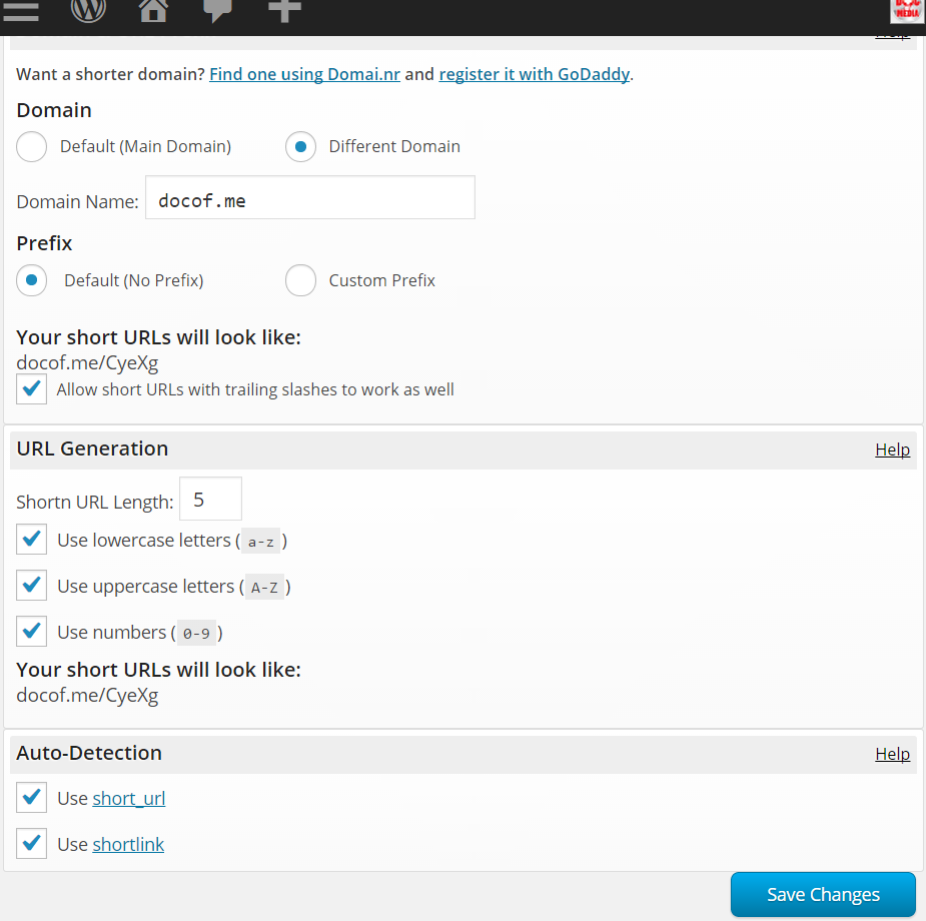
###1. Shortn.It's options
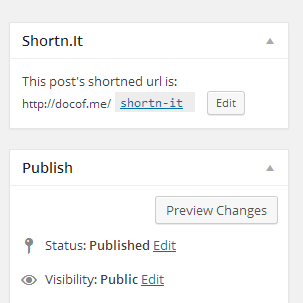
###2. Shortn.It's meta box
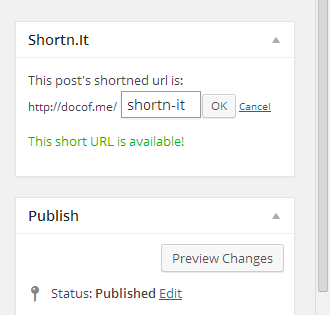
###3. Shortn.It's duplicate URL checking
## Changelog ##
### 1.7.4 ###
* ADDED: Option to filter WP SEO by Yoast canonical links with Shortn.It URLs
### 1.7.3 ###
* ADDED: Filter WP SEO by Yoast canonical links with Shortn.It URLs
### 1.7.2 ###
* FIXED: Forgot one shorthand array declarations throwing syntax errors in older versions of PHP
### 1.7.1 ###
* FIXED: Shorthand array declarations throwing syntax errors in older versions of PHP
### 1.7.0 ###
* FIXED: Shortn.It URLs requested with query strings or hashes returning 404 error
### 1.6.0 ###
* FIXED: Incorrect Short.It URLs on custom short domains from WP instances inside subfolders
### 1.5.0 ###
* FIXED: Template tag functions
* ADDED: New template tags
### 1.4.0 ###
* IMPROVED: HTTPS detection
### 1.3.0 ###
* ADDED: Trailing slash option
### 1.2.0 ###
* FIXED: Shortn.It URL checking throwing errors
### 1.1.0 ###
* FIXED: Not finding Shortn.It URLs for improperly registered post types
## Upgrade Notice ##
### 1.1.0 ###
New Shortn.It URLs that were being generated and checked for duplicates were throwing areas. Upgrade immediately!
### 1.1.0 ###
Shortn.It URLs are generated for any post type, but weren't able to be retrieved for improperly registered post types. Upgrade immediately to prevent your Shortn.It URLs from returning 404 Not Found errors.