The zoom meeting is scheduled on data [copy]15 November 2022[/copy] please note down it.
Here,
In the above paragraph, On click on date **15 November 2022** it will copy to the clipboard.
Another example,
Hello Students,
Please save the next meeting link [copy content="https://meet.google.com/_meet/mbz-zncr-efk?ijlm=1659873953647&adhoc=1&hs=187"]Click to Copy Link[/copy] for next meeting.
In this example, When someone click on **Click to Copy Link** then the meeting URL will copy to clipboard.
Above are some common use cases.
You can use it as you want.
Read more about all shortcode options
== Way 2 – Copy with CSS Target
This is the most useful way and is mostly used by a lot of users with this plugin
==== Use Case 1: How to add the copy button to Blockquote
- **Step 1** – Go to “Copy to Clipboard”
- **Step 2** – Click on the “Add New” button
See the below screenshot for reference:
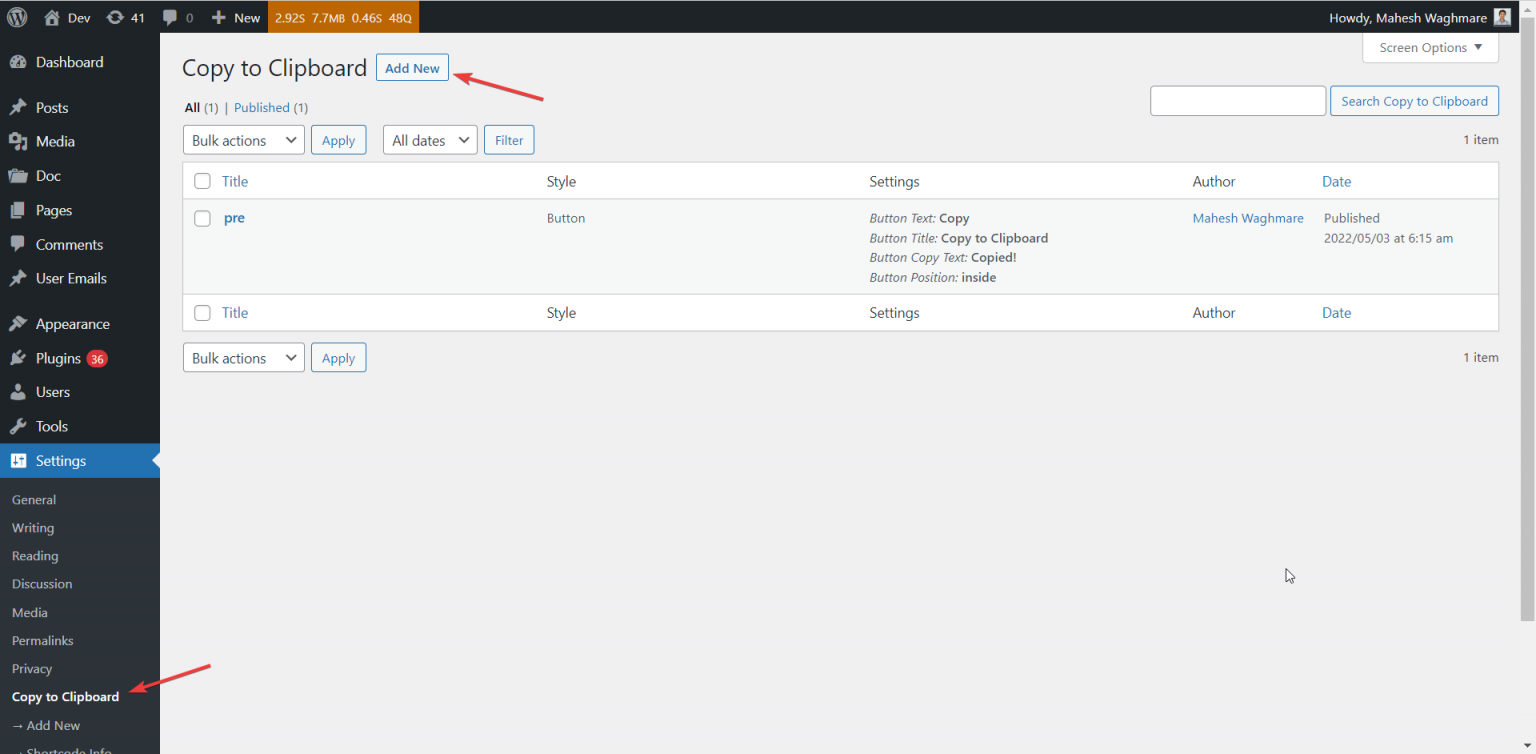 You’ll see the screen something as below:
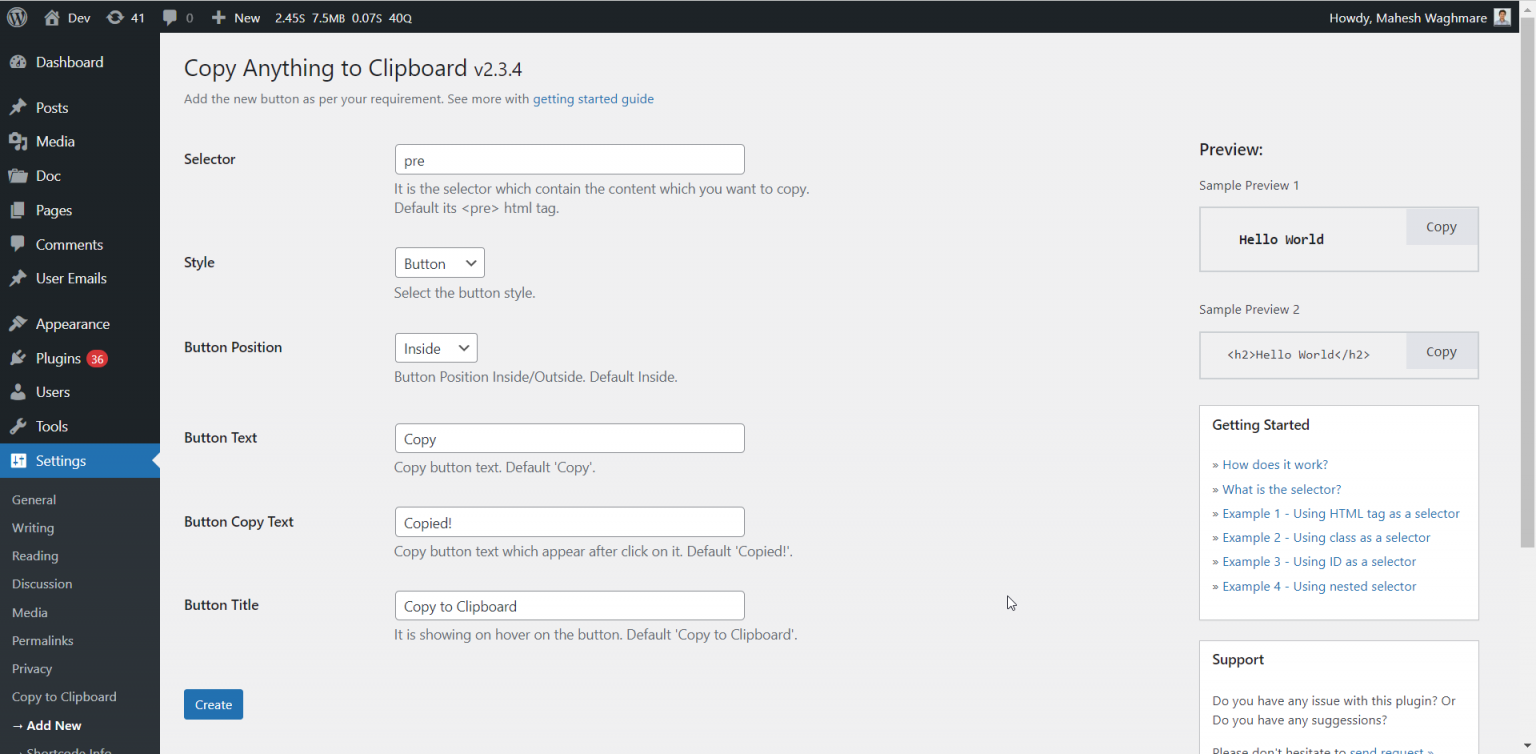 Now, Just do:
- **Step 3** – Add the selector as a blockquote
- **Step 4** – Click on “Create”
Now, Just do:
- **Step 3** – Add the selector as a blockquote
- **Step 4** – Click on “Create”
 **DONE!**
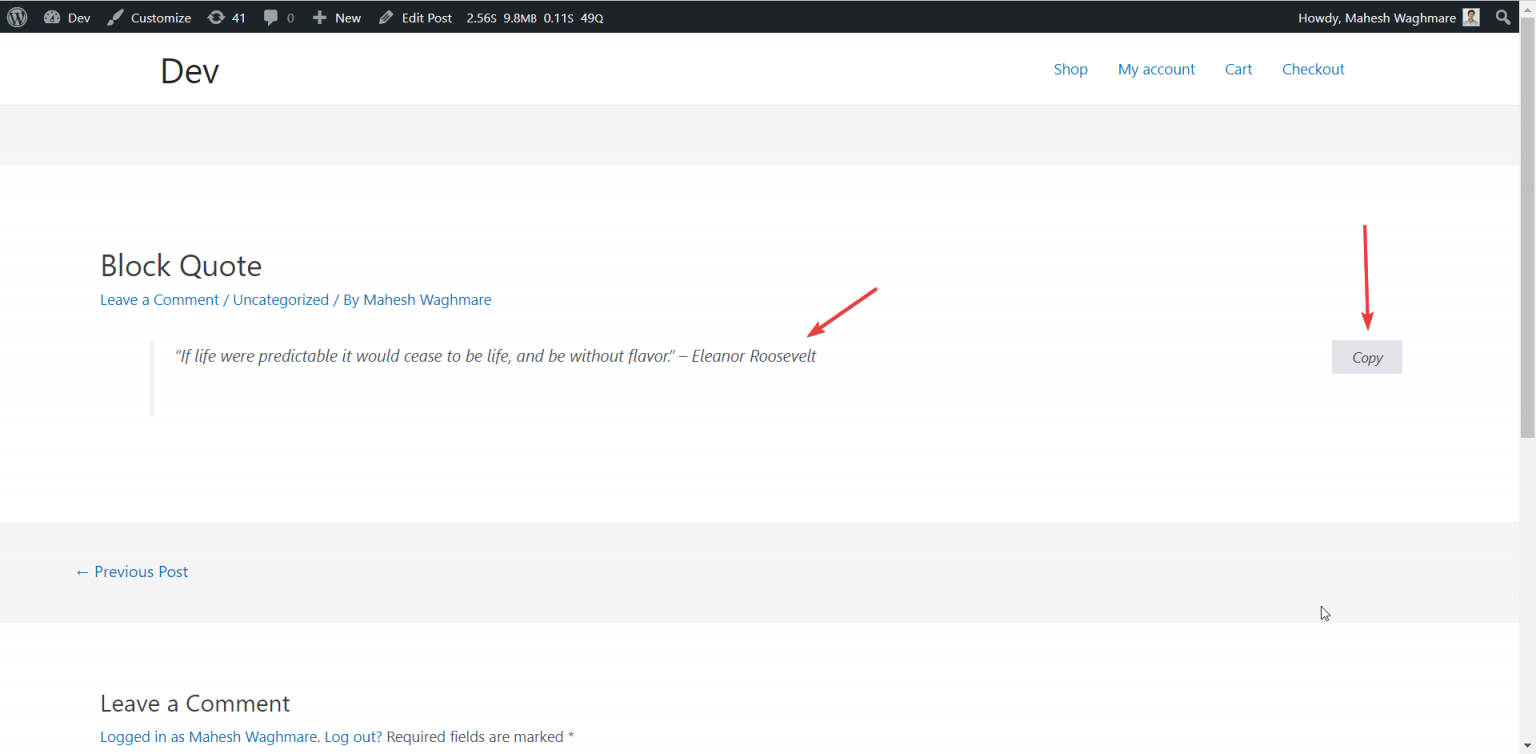
That’s it. You don’t need to do anything. If you visit the blockquote you’ll see something as below:
**DONE!**
That’s it. You don’t need to do anything. If you visit the blockquote you’ll see something as below:
 Read more about Copy Anything to Clipboard
== 🤩 FREE and Popular Copy to Clipboard Plugin Ever
Over **10,000 thousands plus** active people are empowering their websites with “Copy Anything to Clipboard” – 100% compatible for all themes and plugins.
Reasons why people love the Copy Anything to Clipboard
- Zero configuration
- Easy to use
- Copy with shortcode
- Customization options
- Quick support
**Welcome for featured requests**
If you have any suggestion or any featured request then don’t hesitate to contact me.
=== Bug reports
Bug reports for “Copy Anything to Clipboard” are welcomed in WordPress support forum.
=== Further reading
For more info check out the following:
* The [maheshwaghmare.com](https://maheshwaghmare.com/) official website 📌
* The [Contact me](https://maheshwaghmare.com/say-hello/) 👋
* The [Getting started guide](https://maheshwaghmare.com/wordpress/blog/copy-anything-to-clipboard/) 📃
* All other my [WordPress plugins](https://wordpress.org/plugins/search/mahesh901122/) 💎
* Contribute with plugin [contact me](https://maheshwaghmare.com/say-hello/) ✨
* Make a [small donation](https://www.paypal.me/mwaghmare7/) for continue FREE support 💪
== Image Copyrights
Icons made by Pixel perfect from www.flaticon.com
== Installation ==
1. Install the
Read more about Copy Anything to Clipboard
== 🤩 FREE and Popular Copy to Clipboard Plugin Ever
Over **10,000 thousands plus** active people are empowering their websites with “Copy Anything to Clipboard” – 100% compatible for all themes and plugins.
Reasons why people love the Copy Anything to Clipboard
- Zero configuration
- Easy to use
- Copy with shortcode
- Customization options
- Quick support
**Welcome for featured requests**
If you have any suggestion or any featured request then don’t hesitate to contact me.
=== Bug reports
Bug reports for “Copy Anything to Clipboard” are welcomed in WordPress support forum.
=== Further reading
For more info check out the following:
* The [maheshwaghmare.com](https://maheshwaghmare.com/) official website 📌
* The [Contact me](https://maheshwaghmare.com/say-hello/) 👋
* The [Getting started guide](https://maheshwaghmare.com/wordpress/blog/copy-anything-to-clipboard/) 📃
* All other my [WordPress plugins](https://wordpress.org/plugins/search/mahesh901122/) 💎
* Contribute with plugin [contact me](https://maheshwaghmare.com/say-hello/) ✨
* Make a [small donation](https://www.paypal.me/mwaghmare7/) for continue FREE support 💪
== Image Copyrights
Icons made by Pixel perfect from www.flaticon.com
== Installation ==
1. Install the Copy Anything to Clipboard plugin either via the WordPress plugin directory, or by uploading the files to your server at wp-content/plugins.
== Changelog ==
= 2.4.2 =
* Fix: The message "You are just one step away.." is not disappearing after clicking on button. Thanks @MingHong
= 2.4.1 =
* Improvement: Added the sub-menus page links into the post type screen.
* Improvement: Removed the sub-menus Dashboard, Contact Us, Upgrade, and Support Forum.
= 2.4.0 =
* New: Integrated the Freemius library for automatic updates, upgrade and for quick support.
* Improvement: Add new dashboard admin page for Copy Anything to Clipboard.
* Improvement: Deprecated the Shortcode admin page which is no longer used.
= 2.3.5 =
* Improvement: UI improvements in the shortcode information admin page.
* Improvement: Added the title tag support for the shortcode. So, Whenever the user hovers on shortcode text then it'll see the title.
* Improvement: Avoid the remove spaces support by setting false values to the parameter remove_spaces. Use filter from code snippet https://gist.github.com/7c086cdf0837f5864596945086c603c8
= 2.3.4 =
* Improvement: Keep the welcome message only for first time user activate.
= 2.3.3 =
* Improvement: Added a welcome message to the user for smooth plugin onboarding.
= 2.3.2 =
* Improvement: Improve the code with PHPCS fixes.
= 2.3.1 =
* Improvement: Keep the tab spaces while copy to clipboard. Thanks @marius84
* Improvement: Users can now share non-personal usage data to help us test and develop better products.
= 2.3.0 =
* New: Added support to redirect user after copy to clipboard. Thanks @zecke Read more https://wp.me/P4Ams0-aAq
= 2.2.2 =
* Improvement: Getting multiple white spaces in Gutenberg editor.
* Fix: The add new link was wrong which navigate to invalid page.
= 2.2.1 =
* Improvement: Move the parent menus as submenu in settings menu.
= 2.2.0 =
* New - Added shortcode [copy] to copy the content. E.g. [copy]12345[/copy]. Read more at https://maheshwaghmare.com/wordpress/blog/copy-anything-to-clipboard/#shortcode
= 2.1.1 =
* Improvement - Compatibility to WordPress 5.7.
= 2.1.0 =
* New: Added filter `copy_the_code_localize_vars` to allow to copy the content as HTMl instead of text.
= 2.0.0 =
* Tweak: Create a new post copy to clipboard post depends on the old user settings.
* Deprecated: Removed the filter `copy_the_code_enabled` which is no more useful.
* Deprecated: Removed the option `Copy the content` which is no more useful. Will add the support though filter if required.
* New: Added custom post type support to add multiple copy to clipboard buttons with different selectors and styles.
* New: Improve the UI with live preview.
* New: Added the new `SVG Icon` button style to show the SVG icon instead of button.
* New: Added inside and outside position support for the new style SVG Icon.
* New: Added the new `Cover` style to copy the small element in which we could not add the copy button. Such as Emoji and Symbols.
= 1.8.0 =
* New: Set the `Copy Content As` default option with `text`.
* Improvements: Converted the `` tags into the new line if the option "Copy Content As" selected as `Text`. * Improvements: Converted the `
` html tag.

= 1.1.0 =
* Fix: Removed `Copy` button markup from the copied content from the clipboard.

= 1.0.0 =
* Initial release.