Bootstrap Calendar
===
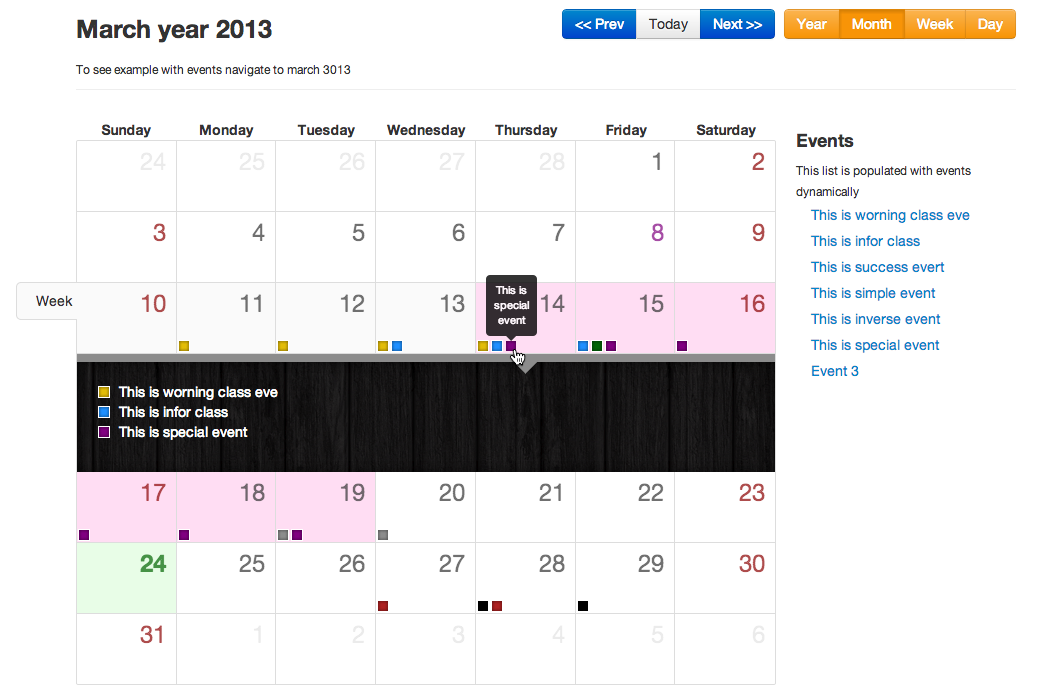
A Full view calendar based on Twitter Bootstrap. Please try the [demo](http://bootstrap-calendar.azurewebsites.net).
### Why?
Why did I start this project? Well, I believe there are no good full view calendar's out there with native Bootstrap support. In fact I could not find even one. A different UI and UX concept approach is also used.
### Features
- **Reusable** - there is no UI in this calendar. All buttons to switch view or load events are done separately. You will end up with your own uniquie calendar design.
- **Template based** - all view like **year**, **month**, **week** or **day** are based on templates. You can easily change how it looks or style it or even add new custom view.
- **LESS** - easy adjust and style your calendar with less variables file.
- **AJAX** - It uses AJAX to feed calendar with events. You provide URL and just return by this URL `JSON` list of events.
- **i18n** - language files are connected separately. You can easily translate the calendar into your own language. Holidays are also diplayed on the calendar according to your language
## How to use
### Install
You can install it with [bower](http://twitter.github.com/bower/) package manager.
$ bower install bootstrap-calendar
Bower will automatically install all dependencies. Then by running
$ bower list --path
You will see list of the files you need to include to your document.
### Quick setup
You will need to include the bootstrap css and calendar css. Here is the minimum setup.
Minimum Setup
Bootstrap Calendar depends on [jQuery](http://jquery.com/) and [underscore.js](http://underscorejs.org/) is used as a template engine.
For the calendar you only have to include the `calendar.css` and `calendar.js` files.
If you want to localize your Calendar, it's enough to add this line before including calendar.js:
Where xx-XX is the language code. When you initializing the calendar, you have to specify this language code:
## Feed with events
To feed the calendar with events you should use `events_source` parameter. It may be a function, array or URL. In all cases you have to set it with valid events array.
See [events.json.php](https://github.com/Serhioromano/bootstrap-calendar/blob/master/events.json.php) file for more details.
`start` and `end` contain dates when event starts (inclusive) and ends (exclusive) in Unix timestamp. Classes are `event-important`, `event-success`, `event-warning`, `event-info`, `event-inverse` and `event-special`. This wil change the color of your event indicators.
### Feed URL
var calendar = $('#calendar').calendar({events_source: '/api/events.php'});
It will send two parameters by `GET` named `from` and `to`, which will tell you what period is required. You have to return it in JSON structure like this
{
"success": 1,
"result": [
{
"id": 293,
"title": "Event 1",
"url": "http://example.com",
"class": "event-important",
"start": 12039485678000, // Milliseconds
"end": 1234576967000 // Milliseconds
},
...
]
}
### Feed array
You can set events list array directly to `events_source` parameter.
var calendar = $('#calendar').calendar({
events_source: [
{
"id": 293,
"title": "Event 1",
"url": "http://example.com",
"class": "event-important",
"start": 12039485678000, // Milliseconds
"end": 1234576967000 // Milliseconds
},
...
]});
### Feed function
Or you can use function. You have to return array of events.
var calendar = $('#calendar').calendar({events_source: function(){
return [
{
"id": 293,
"title": "Event 1",
"url": "http://example.com",
"class": "event-important",
"start": 12039485678000, // Milliseconds
"end": 1234576967000 // Milliseconds
},
...
];
}});
### PHP example
Note that `start` and `end` dates are in milliseconds, thus you need to divide it by 1000 to get seconds. PHP example.
$start = date('Y-m-d h:i:s', ($_GET['start'] / 1000));
If you have an error you can return
{
"success": 0,
"error": "error message here"
}
Here is the example of PHP script.
```php
quote(date('Y-m-d', $start)), $db->quote(date('Y-m-d', $end)));
$out = array();
foreach($db->query($sql) as $row) {
$out[] = array(
'id' => $row->id,
'title' => $row->name,
'url' => Helper::url($row->id),
'start' => strtotime($row->datetime) . '000'
);
}
echo json_encode(array('success' => 1, 'result' => $out));
exit;
```
## Usage warning.
You cannot use the calendar from a local file.
The following error will be displayed :
Failed to load resource: Origin null is not allowed by Access-Control-Allow-Origin.
Using Ajax with local resources (file:///), is not permited. You will need to deploy this to the web instead.
## Modal popup
You can enable a bootstrap modal popup to show when clicking an event instead of redirecting to event.url.
To enable boostrap modal, first add the modal html to your page and provide boostrap-calendar with the ID:
Event
and then set:
modal: "#events-modal"
This will enable the modal, and populate it with an iframe with the contents of event.url .
### Modal content source
There are three options for populating the contents of the modal, controlled by the `modal_type` option:
- **iframe** (default) - populates modal with iframe, iframe.src set to event.url
- **ajax** - gets html from event.url, this is useful when you just have a snippet of html and want to take advantage of styles in the calendar page
- **template** - will render a template (example in tmpls/modal.html) that gets the `event` and a reference to the `calendar` object.
### Modal title
The modal title can be customized by defining the `modal_title` option as a function. This function will receive the event as its only parameter. For example, this could be used to set the title of the modal to the title of the event:
modal_title: function(event) { return event.title }
A calendar set up to use modals would look like this:
$("#calendar").calendar({modal : "#events-modal", modal_type : "ajax", modal_title : function (e) { return e.title }})